Introducing CleanSmart: The No-Code Cure for Messy Data
Meet CleanSmart — AI-powered data cleanup that turns chaotic CRM and marketing data into a single source of truth. No coding required. Try it free.
Your CRM is lying to you. Here's how to fix it in minutes.
That deal you lost last quarter? The one where sales blamed marketing for "bad leads" and marketing blamed sales for "not following up"?
Neither team was wrong. They were both working with garbage.
I've spent fifteen years watching companies hemorrhage revenue because their customer data looks like it was assembled by a distracted toddler with a spreadsheet. Duplicate records. Missing fields. Phone numbers formatted six different ways. Names that read "John Smith," "JOHN SMITH," "john smith," and "J. Smith" - all pointing to the same person your sales team called four times in one week.
Nobody talks about this problem at conferences. It's not sexy. There's no keynote titled "Your Database is a Dumpster Fire and It's Costing You Millions." But there should be.
So I built something to fix it.
Why I Built CleanSmart
Here's the dirty secret about MarTech: most companies spend six figures on platforms they can't trust. They buy Salesforce. They implement HubSpot. They connect seventeen different tools through Zapier integrations held together with duct tape and prayer.
Then they wonder why their email campaigns underperform. Why their sales forecasts miss the mark. Why their "single customer view" shows the same customer living at three different addresses.
The hidden costs of dirty data extend far beyond wasted marketing spend. Bad data corrupts everything downstream, from lead scoring models to customer lifetime value calculations to the quarterly board presentation nobody believes anymore.
I've audited MarTech stacks at Fortune 500 companies. The pattern repeats everywhere: sophisticated tools running on corrupted fuel.
CleanSmart exists because data cleanup shouldn't require a data engineer, a six-month implementation, or a budget that makes your CFO cry.
What CleanSmart Does (In Plain English)
CleanSmart is an AI-powered data cleanup platform that transforms messy CRM and marketing data into something you can trust. No coding. No consultants. No waiting.
Here's what happens when you connect your data:
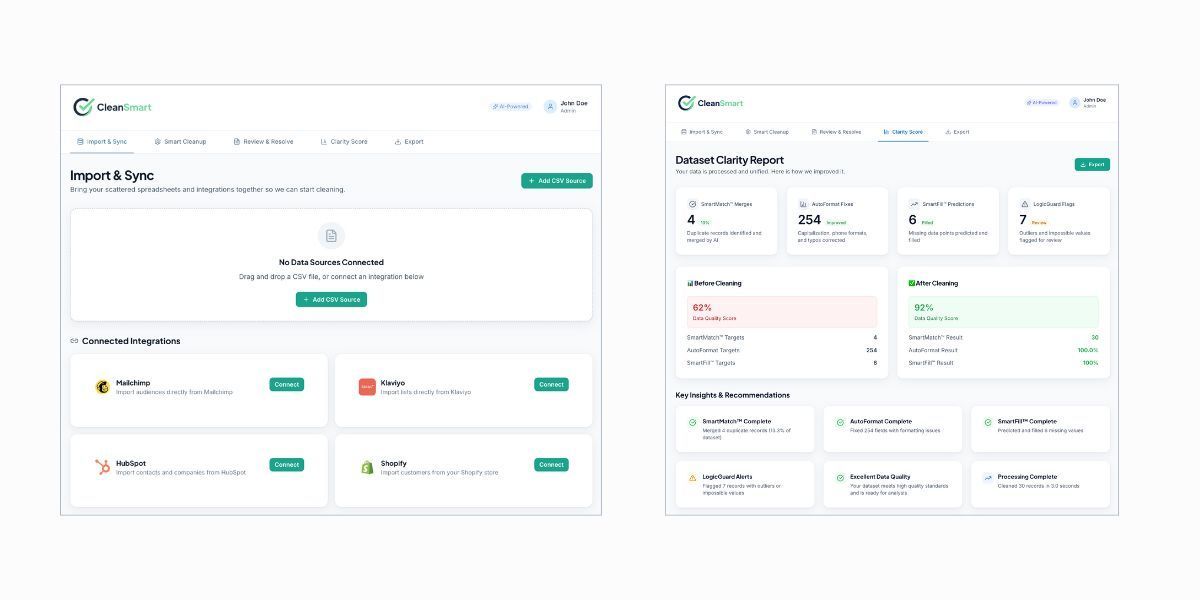
SmartMatch™ - Intelligent Duplicate Detection
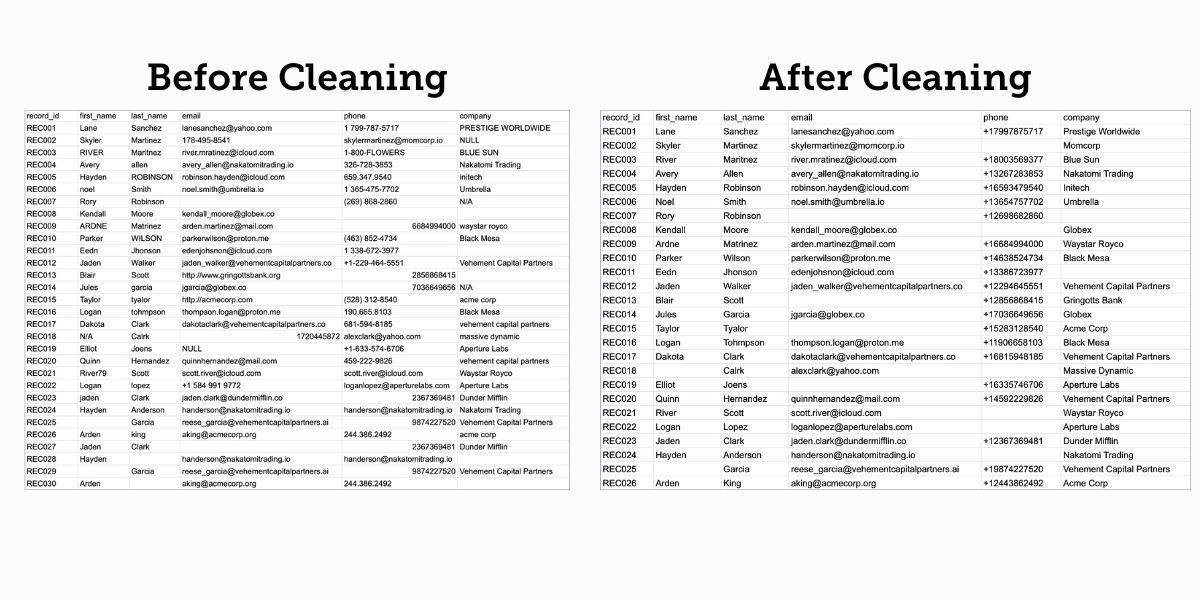
The AI scans your records and identifies duplicates that would fool traditional matching rules. "Robert Johnson" at "ABC Corp" and "Bob Johnson" at "ABC Corporation"? Same person. SmartMatch catches these fuzzy matches and lets you merge them with a click, or review each one if you prefer to stay hands-on.
SmartFill™ - Predictive Gap Completion
Missing fields kill personalization. You can't segment effectively when half your records have blank company names or incomplete location data.
SmartFill analyzes your dataset and fills gaps using intelligent inference. It extracts company names from URLs, populates city and state from verified zip codes, and derives website URLs from email domains. The kind of tedious enrichment work that would take hours in a spreadsheet, done automatically in seconds.
AutoFormat - Instant Standardization
Phone numbers formatted six different ways. Names in ALL CAPS, lowercase, and everything between. Addresses missing zip codes or spelled inconsistently. AutoFormat corrects capitalization, standardizes phone formats, and fixes typographical errors across your entire dataset, instantly. No more exporting to Excel and running find-and-replace for an hour.
LogicGuard - Anomaly Detection
Some data errors aren't formatting problems. They're logical impossibilities. A customer born in 2087. A deal size of negative $50,000. An email address without an @ symbol. LogicGuard scans your dataset for outliers and impossible values, flagging them before they corrupt your analytics or trigger embarrassing automation errors.
Clarity Score - Your Data Health Metric
Every dataset receives a Clarity Score from 0–100%. It's a single number that tells you how much you can trust your data. Most companies I've tested start around 60%. After running through CleanSmart, they hit 90% or higher.
That's not a marketing claim. I've been the primary user during development, stress-testing this thing on real datasets. The jump from "I'm not sure I can trust this" to "I can confidently run this campaign" happens faster than you'd expect.
Who This Is For
The scope of the bad data problem is staggering, and most companies have no idea how deep the damage runs.
Gartner estimates that poor data quality costs organizations an average of $12.9 million per year. Across the U.S. economy, IBM pegs the total at $3.1 trillion annually. And according to Experian, bad data can drain up to 25% of a company's potential revenue.
Here's the part that should terrify you: 60% of companies don't even measure these costs. They're bleeding money and don't know it.
The productivity drain is equally brutal. Employees spend up to 27% of their time correcting data errors instead of doing their actual jobs. Data teams waste 30-40% of their capacity on quality issues rather than revenue-generating work. McKinsey found that poor data quality leads to a 20% decrease in productivity and a 30% increase in costs.
This isn't a minor operational hiccup. It's a quiet catastrophe unfolding in spreadsheets and CRM systems everywhere.
CleanSmart serves two audiences particularly well:
B2B Sales and Revenue Operations Teams
You're drowning in duplicate contacts, outdated records, and CRM data that nobody trusts. Your sales reps have stopped logging activities because "the data's already a mess, so what's the point?" Your forecasts miss the mark because the underlying pipeline data is corrupted. And every quarter, someone spends a week manually deduping before the board meeting.
I've seen this pattern firsthand. At CT3 Education, I led a CRM data cleanup initiative across 150,000+ contacts. The work included deduplication, normalization, and training the sales team on proper data entry standards. The result? A consistent 5-7% monthly increase in closed deals over the following twelve months, without changing anything about the sales process itself.
The data was the problem. Fixing the data fixed the revenue.
Marketing Teams Running Campaigns on Dirty Data
Your email deliverability is suffering because you're sending to invalid addresses. Your segmentation is unreliable because job titles are formatted inconsistently. Your personalization backfires when "Dear FIRST_NAME" shows up in someone's inbox. And your attribution models produce garbage because duplicate records inflate your numbers.
Bad data doesn't announce itself. It quietly sabotages everything downstream, from lead scoring models to customer lifetime value calculations to the quarterly board presentation nobody believes anymore.
If you've ever exported a contact list, cleaned it manually in Excel for hours, then re-imported it while praying nothing broke... you understand the problem CleanSmart solves.
The Technical Details (For Those Who Care)
CleanSmart connects to your existing systems through the Import & Sync page, with secure integrations for Mailchimp, Klaviyo, HubSpot, and Shopify (with more platforms coming soon). You can also upload CSVs directly if you prefer to work offline.
The AI models powering SmartMatch and SmartFill run on your data in isolation. No cross-pollination with other customers' datasets. No training our models on your proprietary information. Your data stays yours.
Every transformation is logged in the Change Log, a complete audit trail showing exactly what changed and why. If you need to explain to compliance why a record was modified, you'll have documentation ready.
Why Now?
I've written extensively about AI transforming CRM data analysis and the data cleanliness challenges that plague marketing organizations. The technology to solve this problem at scale finally exists, and it's accessible enough that you don't need a machine learning team to deploy it.
CleanSmart is in early access right now. The core functionality works. The interface is polished. And I'm actively incorporating feedback from early users to refine the experience before a broader launch.
If you've been waiting for a data cleanup solution that doesn't require a consulting engagement or a computer science degree, this is it.
Try CleanSmart Free
You can create an account and start cleaning data today. The free tier gives you enough capacity to see whether CleanSmart works for your use case before committing to a paid plan.
Or explore the product details if you want to dig deeper before signing up.
The messy data problem isn't going away. But your tolerance for it can.
Frequently Asked Questions
Does CleanSmart work with my existing CRM?
CleanSmart integrates with Salesforce, HubSpot, and Shopify through DataBridge connectors. You can also upload CSV files directly for any system that exports data.
Will AI modify my data without my approval?
No. CleanSmart shows you a preview of all proposed changes before applying them. Every action includes an undo option, and all modifications are logged in the Transformation Log for compliance and audit purposes.
How long does it take to clean a dataset?
Most datasets process in seconds to minutes, depending on size. You'll see your Clarity Score immediately after upload, with specific recommendations for improvement.